
Features
MatRecord replaces the tournament workbook, the paper score sheets, and the group chat where everyone tries to remember who placed what.
A few features need the installed app rather than a browser. Those are marked Installed app throughout.
Recording a season
Profiles
Competitors, instructors, head instructors and school owners, each with a separate competes as setting. An instructor who still competes gets the right title and full points tracking; staff who don't compete stay out of the results pickers entirely.
Tournaments
An event is entered once and every competitor's result attaches to it, not one copy per child. Dates, locations, class and logo live with the tournament.
Results and points
One points engine, used by every screen. Tournament classes, caps, best-N counting and the restricted-class rules are all configurable, and the app ships with 52 acceptance tests you can run yourself from Settings.
Season forecasting
Each profile shows season stats and what is still reachable, so you know whether the next tournament matters before you book the hotel.
Teams
Team records with rosters, points and eligibility rules: which ranks qualify, whether only point-earning tracks count, and which divisions your teams compete in.
Expenses
Off by default, because most people tracking results have no interest in tracking money. Switched on, it attaches costs to a competitor, a tournament, a team, or any combination, and puts a hotel booked in June against the July event's season.
At the tournament
Live scoring
Pick the ring's judge count, enter each judge's score, and watch totals and places recalculate as you type, with the keyboard staying put while they do. Drop high and low where your organization uses it.
Ties, handled
When competitors tie for a medal position the app raises a tie-break rather than guessing: record the method, the resulting order and any notes.
Brackets
Sparring and combat brackets with byes placed properly: spread through the bracket, or at either end, as your organization does it. Rounds are renamable and a corner can be scored before the names are known.
Team brackets
Each corner gets a roster rather than a single score. Every competitor's score is entered, the corner shows a running total, and the higher total takes the match.
Judges and weapons
Judged sheets record who is judging, with names, ranks and schools remembered for next time. Weapons events gain a weapon column, filled in from the competitor's usual weapon.
Photos and video
Film at 1080p, tag it with the competitor and the event, and find it by either later. Clips and photos are filed into their own album on your phone.Installed app
What is still reachable
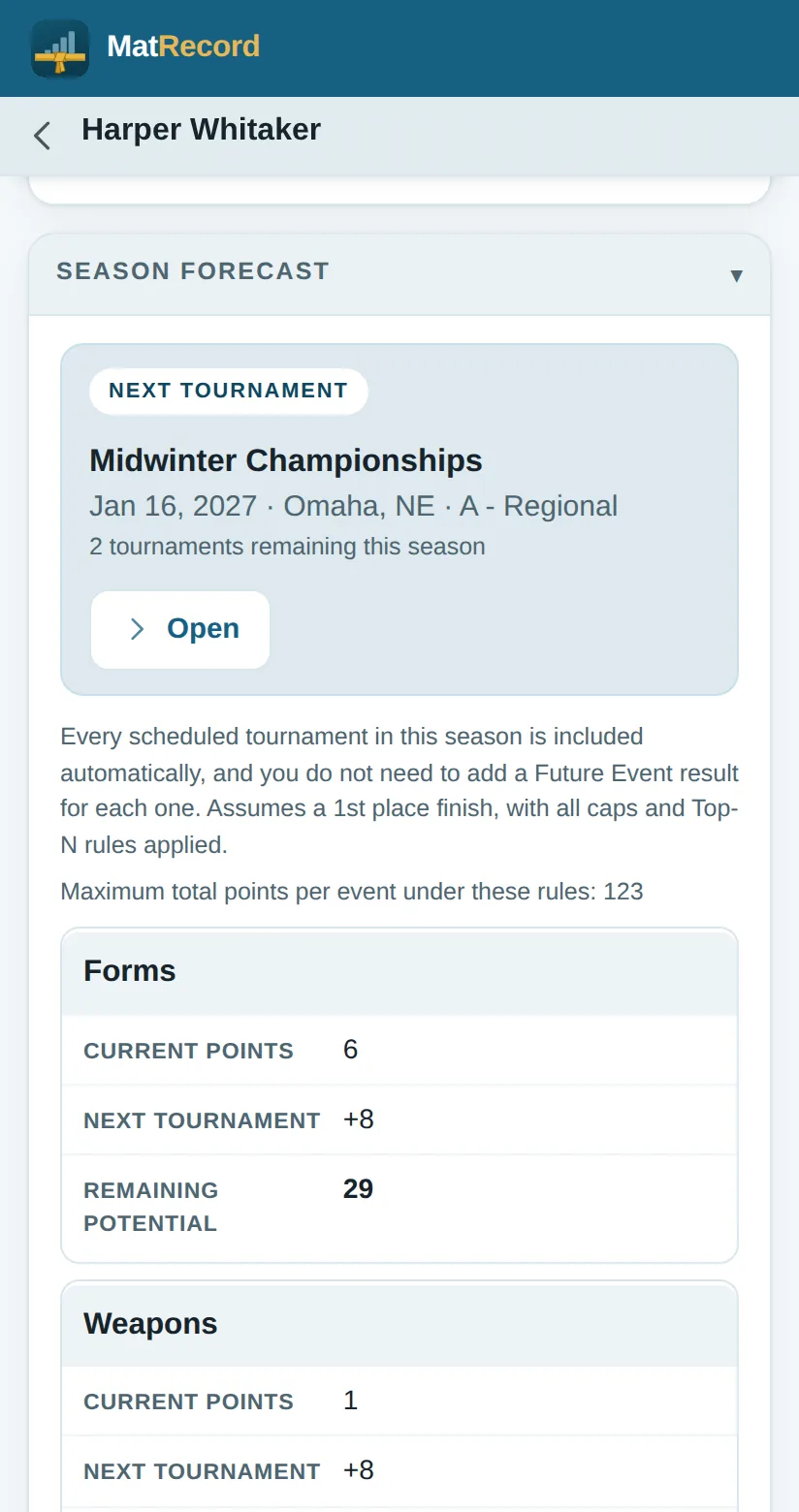
Every scheduled tournament in the season is counted automatically and you don't add a placeholder result for each one. The forecast assumes a first place finish and applies every cap and best-N rule, then shows current points, what the next tournament is worth, and what remains, for each event separately.
Season forecast on a competitor's profile.
Medals, counted event by event
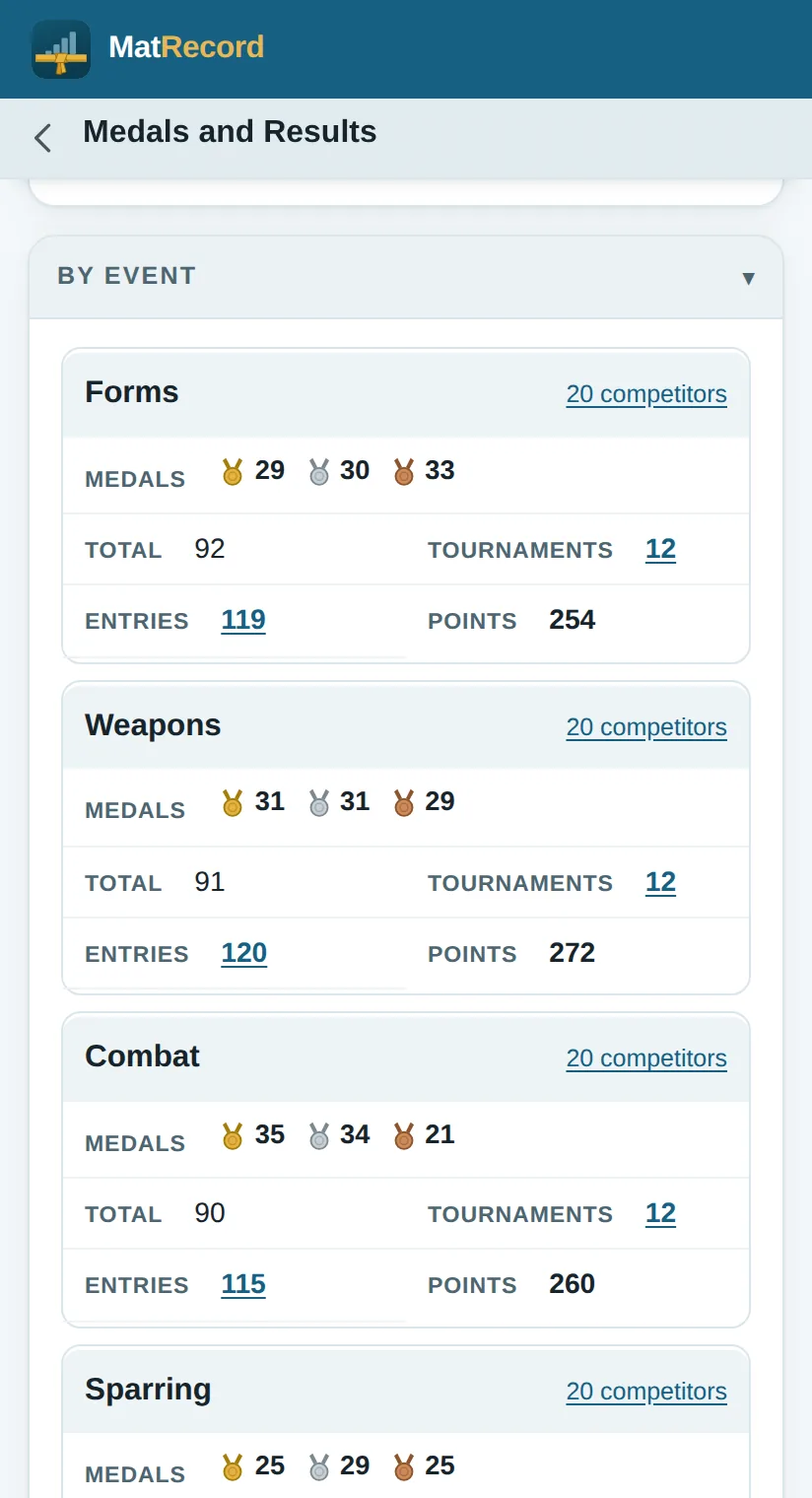
The whole record broken down the way people actually ask about it by season, by event, and by how many of each color. It reads the same whether the results were entered one at a time as they happened or typed in later as totals.
The By Event breakdown, across every season.
Rankings and schedule
Standings
Keep state, world and team standings alongside your own records, filtered by event, division, belt rank, age group and state. Paste a whole standings page in at once and the app splits it into its eight sections and matches names against your roster.
Ranking links
Choose a division, belt rank and age group and the app builds the
division code for you, so Girls, Color Belt, 9–10 becomes
GCOB, then opens that exact division. The links
themselves are editable, and you can add your own.
Download the event list
Read your organization's tournament schedule straight from their site instead of copying it across by hand. A browser cannot do this, because one website is not allowed to read another unless it is invited, so it is one of the things the installed app adds.Installed app
Reminders
A nudge three days before a tournament, before registration closes, when a season is ending with results unrecorded, or when a score sheet was left unfinished. Every one is off until you ask for it, and all of them are worked out on your device.Installed app
Getting data in and out
Sharing with a coach
Filter by competitor, team, season and tournament, then choose what travels: score sheets, rankings, logos, photos, settings, the manual. Team data only sends a squad without everyone's personal results.
Imports you can undo
An import shows added, updated, unchanged and conflicting records before anything is written, and lets you resolve each conflict side by side. Every import is undoable from the history.
No duplicates
Records match on their identifier first, then on natural keys: a competitor by name and member number, a tournament by date, name and state. The same tournament arriving from four families consolidates into one record, not four.
Spreadsheets
Seven sets, competitors, tournaments, teams, results, standings, medals and expenses, as Excel or CSV, filtered by season, competitor or tournament. Competitors, tournaments and teams export in the shape the importer reads, so a sheet can go out, be edited, and come back.
Photos are treated as personal
Competitor photographs are excluded from shares by default, with location data stripped and the image downscaled on import. Tournament logos are event branding, so those travel by default. Full backups carry both.
Printing
Any page prints what is on screen, with no separate report to keep in step. Controls come off, folded sections open, tables get ruled for paper, and a header names the page, the team and the time. Every print dialog also saves as PDF.
Making it yours
The belt set
Rename, recolor, reorder, add and delete belts, and tick which ones your school actually awards. Belts support up to three colors along their length, a center stripe, a colored tip, camouflage, and a degree insignia, so Roman numerals and stars both work.
Divisions and scoring
Turn a division axis off if your organization doesn't use it, or on such as weight class, if it does. Places, roles, competition tracks, judging defaults and bracket rules are all editable.
Rules and the manual
Both are editable text, not baked into the app. Rewrite any page to match how your school works, then export it and share it with everyone else.
Locations
Add as many sites as you run. Every profile belongs to one, and page headers gain a switcher so an owner can view one site or all of them.
Appearance
Six color presets, or set the primary, accent, background, card and text colors individually. Light and dark, following your device or pinned to one.
Its name
Call it MatRecord, call it your team's name, or call it after the competitor whose season it is following. It changes the header, the tab and the home page.
Works with no signal
Everything above runs on the device with nothing to reach for. That matters in a gym with four hundred people and one bar of service, which is where you will actually be using it.